레이블이 클라이언트인 게시물을 표시합니다. 모든 게시물 표시

2014년 11월 28일 금요일

자바 코드와 외부 jar 라이브러리를 하나로 합치기

자바 어플이케이션을 작성하다보면 외부 jar 라이브러리가 수 십개가 넘어가는 일이 다반사이다. 배포 및 관리의 편의를 위해서 어플리케이션에서 사용하는 공통 코드와 외부 jar 라이브러리를 하나로 합쳐보자.


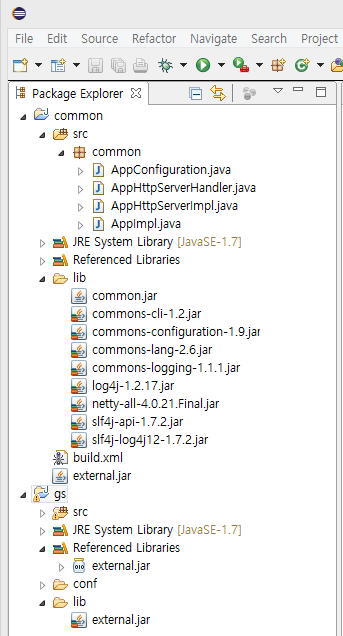
두 개의 프로젝트 common과 gs가 있다. gs는 개발하려는 최종 어플리케이션 프로젝트이고 common은 gs와 기타 다른 프로젝트에서 공통으로 쓰일 코드와 외부 jar 라이브러리로 구성된 프로젝트이다. common 프로젝트에서 코드는 빌드하여 lib/common.jar로 생성하고 이후 lib 폴더에 모든 jar를 external.jar 파일 하나로 합쳐서 gs 프로젝트의 lib 디렉토리에 복사하는 ant 스크립트를 아래와 같이 작성하였다.

<?xml version="1.0" encoding="UTF-8" standalone="no"?>
<project basedir="." default="package-external-jar" name="common">
  <target depends="pacakge-common-jar" description="" name="package-external-jar">
    <zip destfile="external.jar">
      <zipgroupfileset dir="lib" includes="*.jar">
    </zipgroupfileset></zip>
    <copy file="external.jar" todir="../gs/lib">
  </copy></target>
  <target name="pacakge-common-jar">
    <jar destfile="lib/common.jar">
      <fileset dir="bin">
      <fileset dir="src" includes="**/*.java">
    </fileset></fileset></jar>
  </target>
</project>

디버깅 편의와 GWT 프로젝트와 같이 소스를 필요로 하는 경우를 위해 common 프로젝트 코드를 빌드할 때 소스를 추가하였다. 이제 gs를 배포할 때 깔끔하게 external.jar 하나만 있으면 된다.

2014년 11월 26일 수요일

Cocos2d-x Scene 노드를 Lua 스크립트로 실시간 제어하기

Cocos2d-x의 경우 Unity 처럼 Scene 에디터와 통합된 개발환경이 아니기 때문에 Scene을 구성하는 각각의 자식 노드를 생성하기 위해 직접 코드를 작성해야 한다. 물론 CocoStudio 같은 에디터를 사용하면 Scene 구성을 좀 더 편하게 할 수 있지만 이미 한참 진행된 프로젝트의 경우 적용하기가 쉽지 않다. UI의 경우 프로젝트 진행 중 Look and feel이 여러번 바뀌는 경우가 많은데 UI 수정 작업 시간의 대부분은 노드의 위치를 새롭게 변경하기 위해 반복적으로 코드를 컴파일하고 실행, 확인하느라 소모되는 경우가 많다. 다음은 Scene 노드를 Lua 스크립트로 제어할 수 있도록 작성된 코드로 특정 노드의 상태(위치 등)를 Lua 스크립트를 통해 변경, 확인이 가능하다.

DebugNode.h
#ifndef __DEBUG_NODE_H__
#define __DEBUG_NODE_H__

#include "cocos2d.h"

USING_NS_CC;

class DebugNode : public Node {
public:
  DebugNode();
  virtual ~DebugNode();

  CREATE_FUNC(DebugNode);

public:
  virtual bool init();
  void apply(const std::string &script);

private:
  std::string m_script;
};

#endif

DebugNode.cpp
#include 
#include 

#include "DebugNode.h"

DebugNode::DebugNode() {
  m_script = "";
}

DebugNode::~DebugNode() {
  stopAllActions();
}

bool DebugNode::init() {
  Node::init();
  return true;
}

void DebugNode::apply(const std::string &script) {
  m_script = script;

  LuaEngine *luaEngine = LuaEngine::getInstance();
  ScriptEngineManager::getInstance()->setScriptEngine(luaEngine);

  auto L = luaEngine->getLuaStack()->getLuaState();

  // DebugNode의 부모 Node를 루아 스크립트 전역 변수 rootNode로 지정한다.
  luaEngine->getLuaStack()->pushObject(getParent(), "cc.Node");
  lua_setglobal(L, "rootNode");

  // 지정된 스크립트 파일을 실행한다.
  luaEngine->executeScriptFile(m_script.c_str());

  // 이후 1초 마다 스트립트를 재실행한다.
  auto action = RepeatForever::create(
    Sequence::createWithTwoActions(
      DelayTime::create(1.0f),
      CallFunc::create(
        [&]() {
          LuaEngine::getInstance()->reload(m_script.c_str());
        })));
  runAction(action);
}

제어할 Scene 노드의 자식으로 DebugNode 객체를 생성해서 추가하고 apply 함수를 호출하면 1초에 한 번씩 지정된 Lua 스트립트 파일을 실행하는데 제어할 Scene 자식 노드는 setName 함수를 사용하여 유일한 이름을 지정해 주어야 한다. 다음의 샘플은 Cocos2d-x에 포함된 cpp-empty-test 프로젝트에 DebugNode를 적용한 부분의 코드 조각이다.

HelloWorldScene.cpp
bool HelloWorld::init()
{
  (생략)
    
  /////////////////////////////
  // 3. add your codes below...

  // add a label shows "Hello World"
  // create and initialize a label
    
  auto label = LabelTTF::create("Hello World", "Arial", TITLE_FONT_SIZE);

  // 스크립트에서 참조할 이름을 지정한다.
  label->setName("label");
    
  (생략)

  auto debugNode = DebugNode::create();
  this->addChild(debugNode);
  debugNode->apply("HelloWorldScene.lua");
    
  return true;
}

HelloWorldScene.lua
label = rootNode:getChildByName("label")
label:setPosition(100, 200)

HelloWorldScene.lua 파일을 텍스트 에디터에서 열고 setPosition의 인자를 변경한 후에 저장하면 바로 위치 값이 적용되는 것을 확인할 수 있다.

2014년 11월 24일 월요일

Google breakpad를 이용해서 Android용 Cocos2d-x 게임 크래쉬 리포트를 HockeyApp에 전송하기

HockeyApp에 Cocos2d-x로 개발된 게임의 크래쉬 리포트를 전송하기 위해서 제공되는 HockeyApp SDK는 NDK로 빌드된 C, C++ 코드의 크래쉬 정보 덤프할 수 없기 때문에 Google에서 공개한 크래쉬 리포트 라이브러리인 breakpad를 이용하여 HockeyApp에 전송한다.


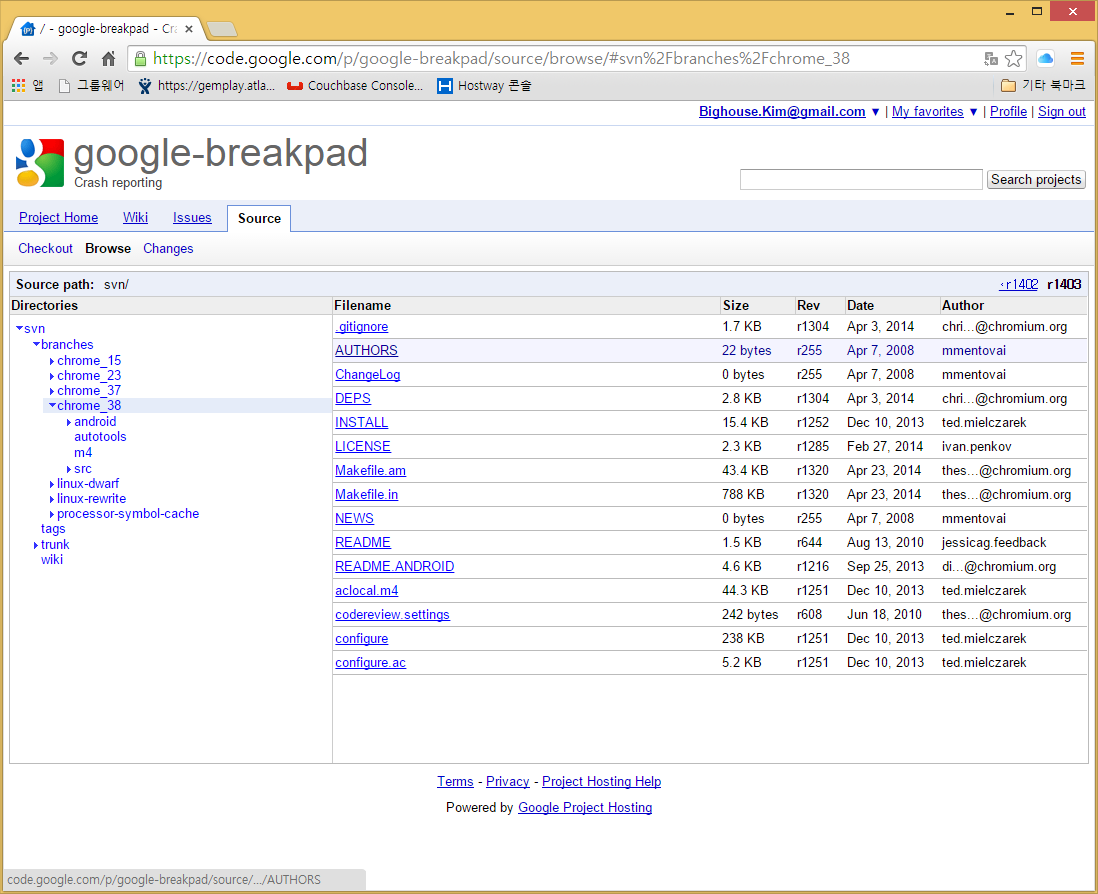
현재 3.x 대 Cocos2d-x 소스는 NDK r9d 이하에서 빌드가 가능한데 breakpad 저장소의 최신 리비전 소스는 NDK r10c 이상을 지원한다. 이전 chrome_38 브랜치 소스를 가지고 라이브러리를 빌드하여 문제를 해결한다.


breakpad 라이브러리 빌드를 위해서 (path_to_breakpad)/android/sample_app 디렉토리에 있는 샘플 프로젝트에서 Application.mk의 내용 중 APP_STL 설정을 stlport_static에서 gnustl_static으로 변경하고 jni 폴더에서 ndk-build를 실행하면 breakpad 라이브러리와 테스트 프로그램 빌드가 시작된다. 빌드가 완료된 후 obj/local/armeabi 디렉토리에 libbreakpad_client.a가 생성되어있음을 확인할 수 있다.


자 이제 Cocos2d-x Android 프로젝트에 앞에서 만들어진 breakpad 라이브러리를 추가하자. 게임 프로젝트에서 위의 그림과 같이 Application.mk의 내용중 APP_STL 설정을 c++_static에서 gnustl_static으로 APP_CPPFLAGS의 -std=c++11에서 -std=gnu++11로 변경한다.


그리고 Android.mk 파일에 breakpad 라이브러리의 헤더 경로를 지정해주고 prebuilt 라이브러리로 등록하여 링크될 수 있도록 위와 같이 설정을 추가하여 빌드한다. 생성된 apk 파일과 심볼 파일을 HockeyApp 사이트에 전송하면 아래와 같은 크래쉬 리포트를 받을 수 있다.


HockeyApp SDK 연동에 대한 자세한 설명은 여기를 참조한다.

2014년 11월 21일 금요일

Cocos2d-x Label에서 긴 문자열을 짧게 잘라 생략(Ellipse) 기호 붙이기

Cocos2d-x Label에서 긴 문자열을 제한된 폭으로 표시해야할 때가 종종있는데 생각보다 구현할 때 고려해야할 사항이 많다.


Cocos2d-x는 내부적으로 스트링 처리에 UTF8로 사용하기 때문에 유니코드에 대응해야하고 Label이 트루타입 폰트로 그려지는 폭을 Kerning을 고려하여 계산해야 하며, FreeType 폰트 캐쉬와 glyph 정보로 그리는 위치 또한 고려해야 한다.

아래의 코드는 Label의 폭을 limitWidth로 제한하고 생략 기호로 "..."를 붙이는 예제이다. 코드의 간략화를 위해서 함수 하나에 담았다.

void shortenLabelTTFString(Label *label, int limitWidth) {
  std::u16string utf16EllipseString;
  StringUtils::UTF8ToUTF16("...", utf16EllipseString);

  std::u16string utf16String;
  StringUtils::UTF8ToUTF16(label->getString(), utf16String);

  auto ttfConfig = label->getTTFConfig();
  auto ttfAtlas = FontAtlasCache::getFontAtlasTTF(ttfConfig);
  ttfAtlas->prepareLetterDefinitions(utf16EllipseString);

  int letterCount = 0;
  auto kerning = ttfAtlas->getFont()->getHorizontalKerningForTextUTF16(
    utf16EllipseString, letterCount);

  int ellipseWidth = 0;
  FontLetterDefinition letterDef = {0};

  for (int i = 0; i < utf16EllipseString.length(); i++) {
    ttfAtlas->getLetterDefinitionForChar(utf16EllipseString[i], letterDef);
    ellipseWidth += letterDef.xAdvance + kerning[i] + label->getAdditionalKerning();
  }

  if (kerning != nullptr)
    delete [] kerning;

  if (ellipseWidth > limitWidth) {
    label->setString("...");
    return;
  }

  letterCount = 0;
  kerning = ttfAtlas->getFont()->getHorizontalKerningForTextUTF16(
    utf16String, letterCount);

  std::string result;
  std::u16string utf16Result;
  int width = ellipseWidth;

  for (int i = 0; i < utf16String.length(); i++) {
    ttfAtlas->getLetterDefinitionForChar(utf16String[i], letterDef);

    if (width + letterDef.xAdvance > limitWidth) {
      StringUtils::UTF16ToUTF8(utf16Result, result);
      label->setString(result + "...");
      break;
    }

    width += letterDef.xAdvance + kerning[i] + label->getAdditionalKerning();

    utf16Result += utf16String[i];
  }

  if (kerning != nullptr)
    delete [] kerning;
}